遇到的情況:
(Windoses 10)
一開始使用分享網路用了一陣子之後會有點不穩定,想要重啟網路設定,
但是遇到未知問題一直卡住,電腦也有點當機狀態,只好將電腦重新啟動。
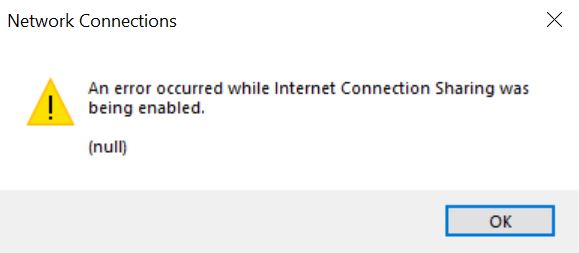
本以為重開機就可以再開啟分享網路,結果遇到以下錯誤訊息:
解決方式:
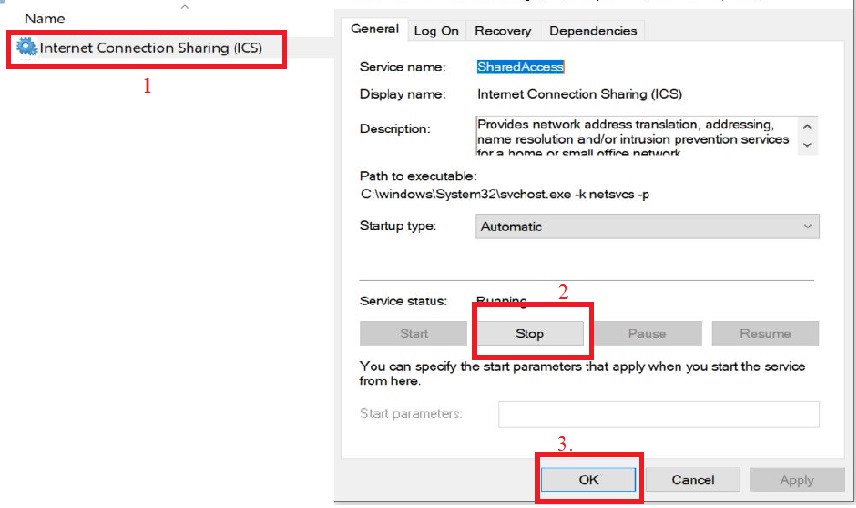
Google 搜尋後,發現可以使用Services.msc 把 ICS 選項按 Stop之後就能再開啟網路分享,
猜想可能是一開始的分享設定沒有關閉完成,才會造成此錯誤。
步驟:
- 在windows 輸入 Services.msc
- 找出 Internet Connection Sharing (ICS) 選項,並按stop
 英文學習.生活記錄